AI gym tracker

Track your reps
in plain English.
AI does the heavy lifting.

Start tracking the second you open it — no signup, no setup, no routines to build. No exercise picker to scroll through. No grid of buttons, sliders, and +/− controls that looks like a jet dashboard. Just type or say what you did — and it's logged, grouped into the workout, and on your progress chart before you're back at the rack.

Free · No subscription required
iOS 16+
No account · No email required

As easy as
texting a friend.

If other gym apps feel like operating a jet cockpit, this one's as easy as texting.

01 / NATURAL LANGUAGE

Plain English in. Structured data out.

Type or dictate the way you'd tell a friend. CNTR's AI parses sets, reps, weight, and exercise name automatically.

3×10 bench at 135
✓ Logged · Bench Press · 135 × 10 × 3
02 / NO GYM-SPEAK

Don't know the name? Just describe it.

"That cable pull-down thing." "The leg machine you sit on." CNTR understands what you mean.

that rowing machine 3×12 at 80
→ Seated Cable Row?
03 / SMART FOLLOW-UPS

Forgot a detail? It asks.

Missing weight, reps, or sets? CNTR asks one short question instead of failing or logging bad data.

did chest press 3×10
How much weight?
60
04 / EQUIPMENT MEMORY

It remembers your machine setup.

Tell it your seat height, pad position, or grip once. Ask any time after — it'll tell you exactly what you used.

pec deck · seat 3 chest pad 4 leg press · back 2 cable row · grip wide
05 / PROGRESS, AUTOMATIC

Every exercise. Tracked over time.

Workouts group by date, exercises chart by week. No spreadsheet. No manual entry. Just real progress.

Bench+15
Pulldown+25
Squat+45

From "I did some sets" to a tracked workout in 3 seconds.

Three steps. No signup, no menus, no exercise picker, no routine builder to fight with.

STEP 01

Open the app between sets.

No login, no setup, no daily routine to load. The keyboard is already up.

STEP 02

Type or speak what you did.

"3×10 bench at 135." "That leg curl machine, 4 sets of 12 at 70." Whatever's faster.

STEP 03

That's it. It's logged.

Sets, reps, weight, and exercise name are saved and charted. Walk back to the rack.

"bench 135, 3x10" → Logged: Bench Press 135 lbs × 10 × 3
"legcurl machne 70 4x12" → Logged: Leg Curl 70 lbs × 12 × 4
"one more" → Logged: Leg Curl 70 lbs × 12 × 1

Talk to it.
Don't fill it out.

A look inside.

Four screens. Four things every other tracker makes hard.

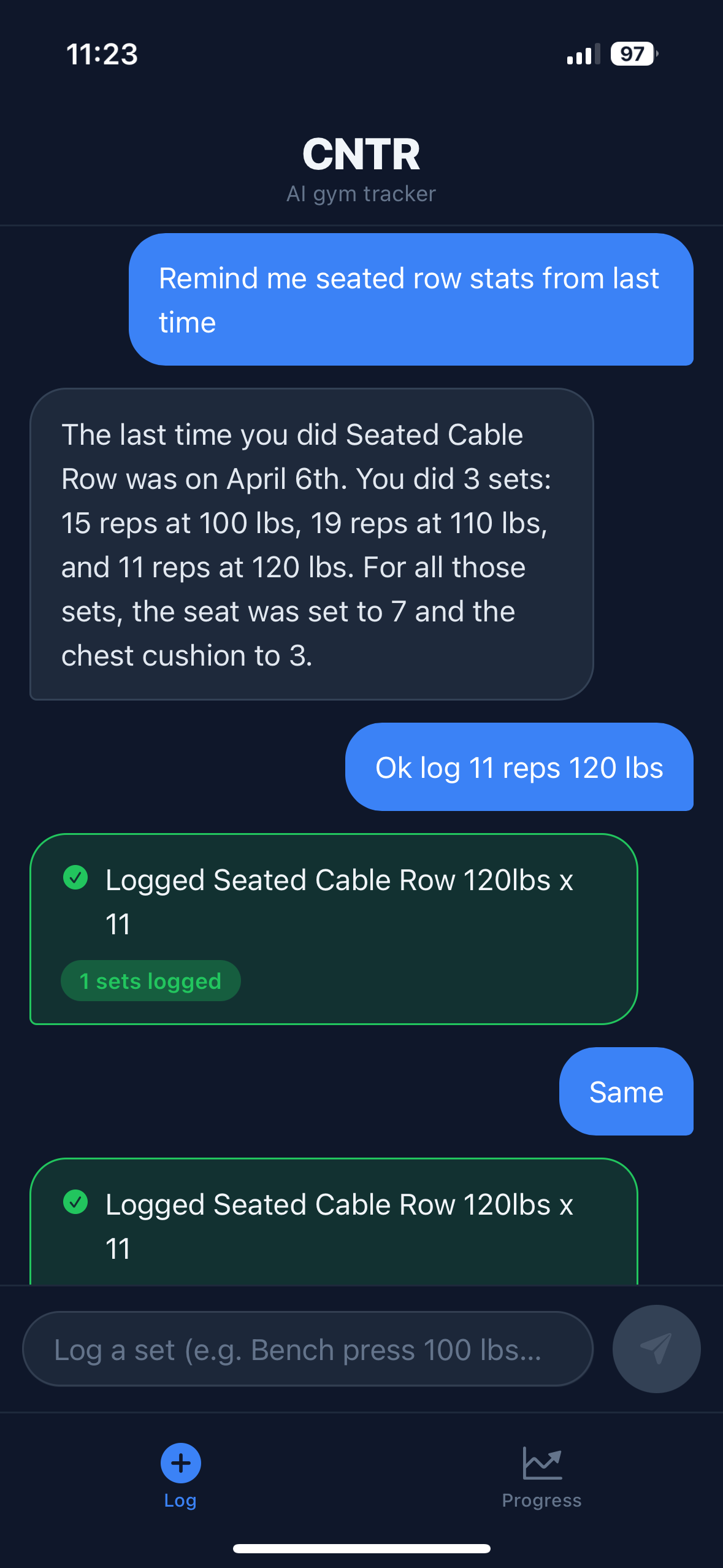
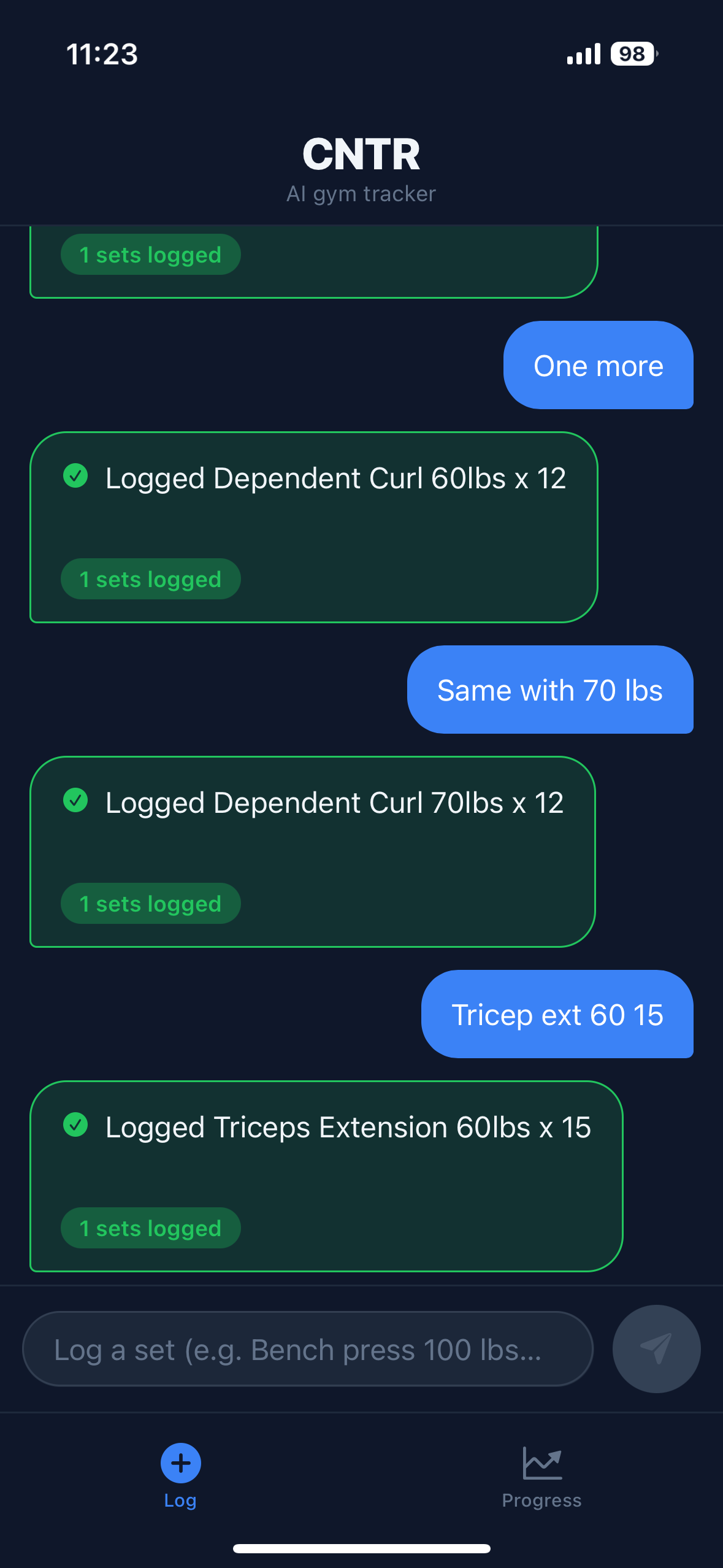
CNTR chat: short messages like 'One more', 'Same with 70 lbs', and 'Tricep ext 60 15' each get logged as full sets
SCREEN 01
Just say what you did.
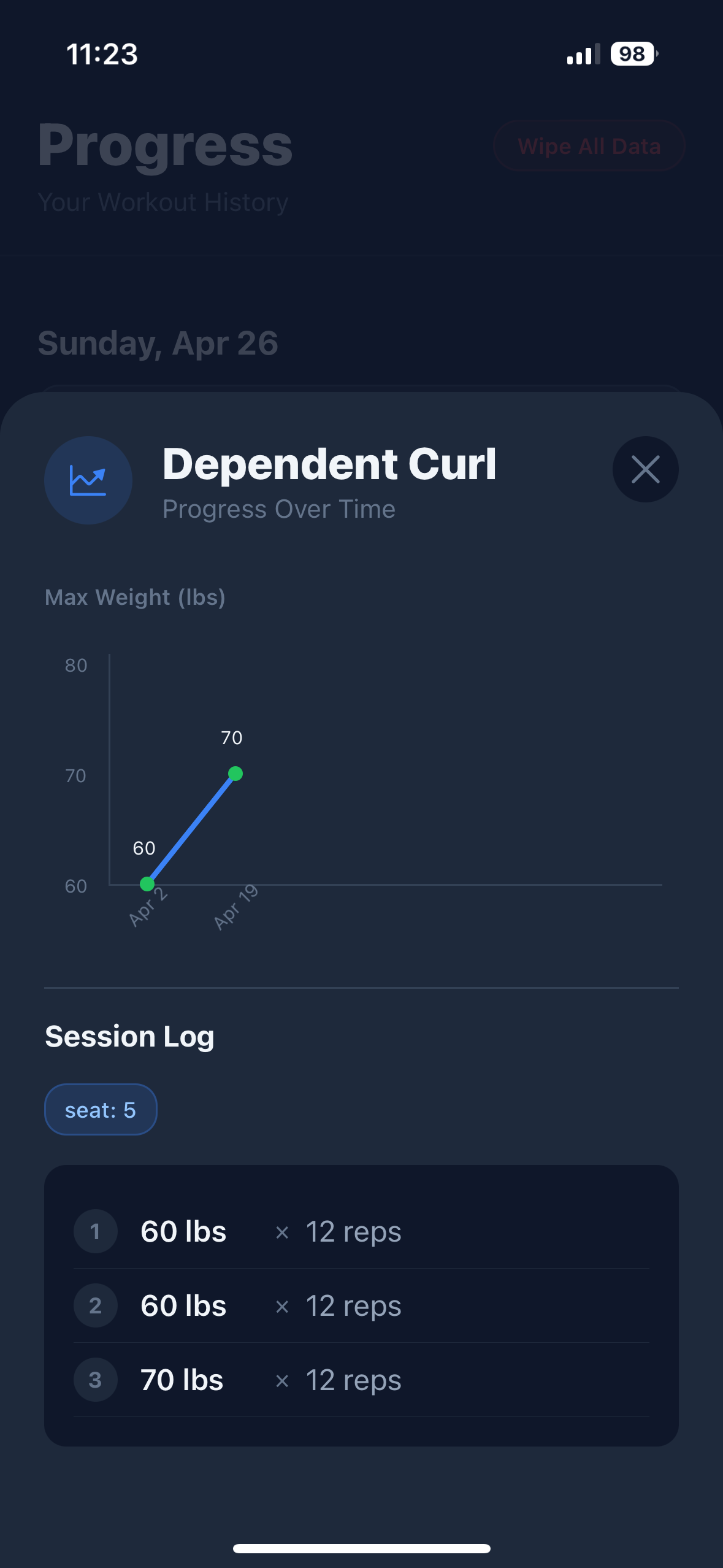
Dependent Curl detail with a 'seat: 5' equipment chip saved alongside the workout log
SCREEN 02
It remembers your machine setup.
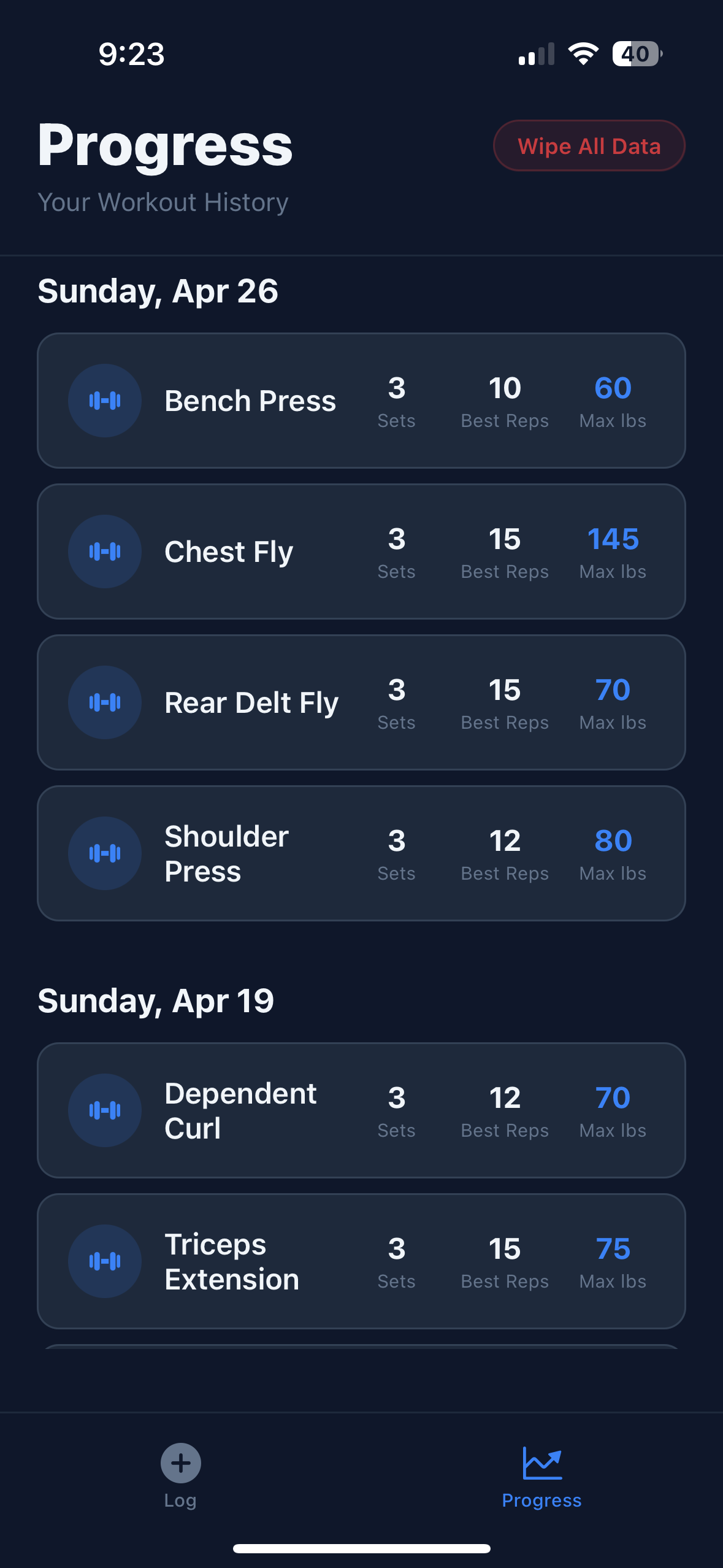
Progress tab listing Sunday Apr 26 and Sunday Apr 19 workouts, each exercise showing sets, best reps, and max lbs
SCREEN 03
Watch yourself get stronger.
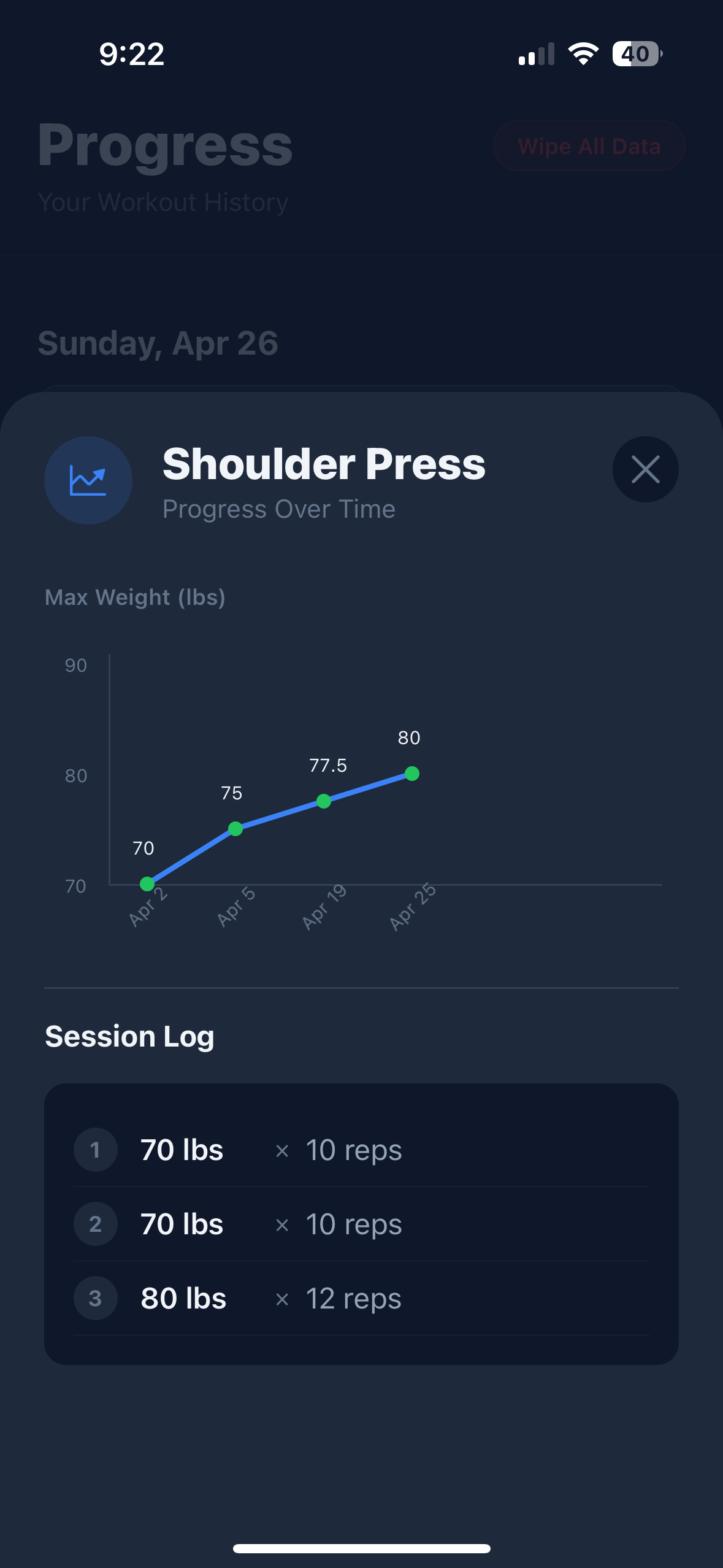
Shoulder Press detail showing max weight climbing from 70 to 80 lbs across four workouts, with a workout log of every set
SCREEN 04
Every exercise. Tracked over time.

Questions, answered.

If yours isn't here, email support@getcntr.app.

How is CNTR different from Hevy, Strong, or Strava?+
Other gym trackers want you to build a routine, scroll an exercise picker, then tap your way through a grid of buttons, sliders, and +/− controls before a set is logged. CNTR skips all of that. Open the app, type or say what you did — "3×10 bench at 135" — and it's logged, grouped into the workout, and charted. If something's missing or unclear, CNTR asks one short question instead of failing or logging bad data.
Do I need an account?+
No. CNTR works with no email and no signup. Your workouts sync to a private device-bound profile so you can keep your history without ever creating an account.
Does it work without internet?+
CNTR needs a connection to run the AI parser when you log a set. Your workout history is cached on-device, so you can browse Progress offline. Logging a new set requires a connection.
Is the AI always right?+
No. CNTR uses AI to parse what you typed and to recall past workouts, and AI can make mistakes — wrong exercise, misread weight, or an off recall. Glance at what was logged. If a set is wrong, swipe left on it in the In Progress tab to delete it, then re-log with clearer wording.
Does CNTR give workout or medical advice?+
No. Under no circumstances does CNTR provide medical, physical-therapy, fitness, or nutritional advice. It's a logging tool — it captures your reps, sets, weight, and progress. It doesn't coach, prescribe routines, or tell you what's safe for your body. Consult a qualified professional for training or medical guidance. See the health & fitness disclaimer in our Terms.
Is it free?+
Yes — logging, full history, progress charts, and equipment memory are all free. A future Premium tier will add coaching, deeper analytics, and exports.
What about my data and privacy?+
Workout text is processed by our AI to extract structured data. We don't sell your data and we don't ask for personal information at signup. Read the full Privacy Policy.

Open it. Tell it.
Done.

Zero learning curve. Zero gym jargon. The gym tracker that finally works for the rest of us.

Download on the App Store iOS 16+ · Free · No account